There has never been a better time to plan your own finances, and there has never been more confusion about what "free" means when you do it. Mint is gone. Empower is free and excellent and wants to manage your money. Boldin and ProjectionLab are the most capable tools most people can buy, and they are not free. Your brokerage has a planner that is genuinely good and quietly assumes you will keep your money there.
This is an honest comparison of how you can build a comprehensive financial plan yourself, for free, on the internet today — and precisely where each route stops.
Prices and features described here are accurate as of August 2026. This is the fastest-moving corner of personal finance software; verify current pricing before you commit to anything.
The thing nobody says out loud
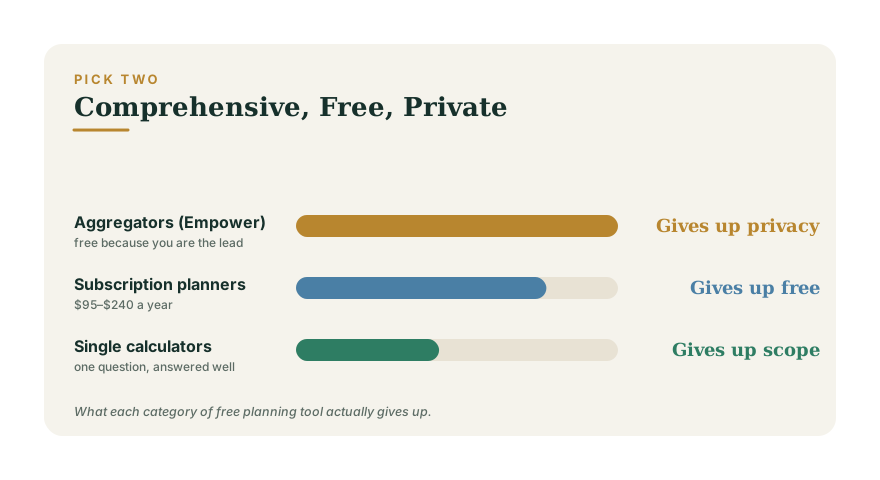
You can have a planning tool that is comprehensive, one that is free, and one that is private. Getting two is easy. Getting all three is, at the moment, not really on offer — and understanding why explains the entire market.
When Mint shut down in March 2024, the common reading was that Intuit had lost interest. The more useful reading is economic. Mint's model was free, comprehensive account aggregation paid for by advertising. Bank-linking is not free to provide: every one of these products pays an aggregator — Plaid, MX, Finicity — per connected account, every month. Once that cost is real, a free do-everything tool has to be funded some other way. Every modern alternative either charges you a subscription, uses your data to sell you something, or narrows what it does.
So the right question is not "which free tool is best?" It is "which trade am I making, and do I mind?"
Category 1: Free aggregators — you are the lead
Empower Personal Dashboard (formerly Personal Capital) is the strongest free tool in this space and it is not close. Link your accounts and you get automatic net worth tracking, a genuine investment-fee analyser, portfolio allocation, and a retirement planner running thousands of Monte Carlo simulations against your real balances. If someone asks for "the best free financial planning tool", this is the honest answer.
It is free because it is the front end of a wealth-management business charging roughly 0.89% of assets under management a year. The dashboard is how they find clients. Users with meaningful balances report calls, emails and in-app prompts pushing advisory services — and the more assets you link, the more attention you receive. That is not a scandal; it is the deal, and it is disclosed. But it is the deal.
Two things follow. Your complete financial picture sits with a company whose business model is selling you advice on it. And the tool's roadmap answers to that funnel, not to you.
Best for: people who want serious free analysis, have the discipline to decline a sales call, and are not troubled by an advisory firm holding a live map of their money.
Category 2: Subscription planners — you pay, so you are the customer
Boldin (formerly NewRetirement, roughly $120–$240 a year) is the most comprehensive DIY planning tool available to a consumer. It models Roth conversions, Social Security timing, Medicare, long-term care, part-time income and drawdown order — the things that actually decide retirement outcomes and that most calculators ignore. ProjectionLab (around $95 a year) is the better tool for early retirement and scenario work, with timeline modelling that lets you compare a dozen versions of your life side by side.
Both have free tiers. Both are deliberately limited enough that anyone doing real planning will hit the wall.
The honest case for paying: at roughly $10–20 a month, these cost less than a single hour of an advisor's time per year, and a correct Roth-conversion decision can be worth five figures. If your situation is genuinely complex, this is the best money in personal finance.
Best for: anyone within fifteen years of retirement with meaningful assets and real decisions to make.
Category 3: Your brokerage's planner — good, free, and not neutral
Fidelity, Vanguard and Schwab all offer free retirement planning tools, and most people underrate them. Fidelity has the broadest free suite, including Social Security, Roth conversion and RMD calculators. Vanguard's runs simulations on your inputs. Schwab's core calculators are open to anyone, account or not.
The limitation is structural rather than sinister. These are built by firms that hold assets, so they model the world their products live in. They are excellent on accumulation and investing, thinner on the messy parts — tax across account types you hold elsewhere, insurance, estate, the ordering of withdrawals across institutions. A planner that cannot see the accounts you hold at a competitor is not a complete planner.
Best for: a strong second opinion, and for anyone whose money genuinely sits in one place.
Category 4: Government and nonprofit calculators — narrow and authoritative
The Social Security Administration's own calculators are the closest thing to ground truth on benefits, and nothing commercial beats them for that one question. Worth noting: the SSA says plainly that its online estimator is not the same calculator used for official determinations and may differ from a real one.
These tools answer one question well and make no attempt at a plan. Use them to check a number a planner gave you.
Category 5: Spreadsheets — free, private, and yours to maintain
A spreadsheet is the only option here that is simultaneously free, completely private, and unlimited in what it can model. It is also the only one where you are responsible for the maths being right.
This is a real trade and it cuts both ways. A spreadsheet will happily let you compound an error for thirty years. But it will also model your exact situation, never sell you anything, and still open in twenty years' time. For people who enjoy this, nothing else compares. For everyone else, the maintenance is the problem: the plan is only as current as the last evening you spent updating it.
Category 6: AI chat — fluent, and not accountable
Asking ChatGPT or Claude to build you a financial plan produces something that reads beautifully. It is genuinely useful for understanding concepts, drafting questions for an advisor, or explaining why a rule exists.
Three things it is not. It is not a fiduciary — nobody is accountable if the answer is wrong. It makes arithmetic mistakes, including on straightforward problems, and states them with the same confidence as everything else. And it may be working from tax rules that have since changed.
Treat it as a very well-read friend rather than a planner: excellent for understanding, poor for deciding.
Category 7: WealthSerene
Since this is our site, the fair thing is to be specific about both halves.
What it does: a comprehensive plan across retirement projections with Monte Carlo, Roth conversion and RMD analysis, Social Security timing, tax strategy, college funding, insurance needs, estate basics, credit, budgeting, debt payoff and net worth — free, with no account required, and with none of your numbers leaving your browser unless you choose to save them. There is no bank linking, which is the point: nothing to breach, nothing to sell, no aggregator fee to fund.
Where it falls short, honestly:
- You type everything in. No account aggregation means no automatic updates. Empower refreshes itself; this does not. If you will not maintain it, a linked tool will beat it in practice regardless of what it can model.
- The budgeting is planning, not tracking. It works from figures you supply, and cannot categorise real transactions or tell you where the money actually went last month. A dedicated tracker does that far better.
- No tax filing. Tax strategy is modelled; returns are not prepared.
- No human anywhere. No advisor, no review, no fiduciary. For a genuinely complicated situation — a business sale, a divorce, a large concentrated position — that is a real gap and no software fills it.
- Retirement modelling is thinner than Boldin's. Long-term care, detailed Medicare and multi-account withdrawal sequencing are not modelled at the depth a dedicated paid planner reaches.
- Mobile apps exist but are not published yet. It is a website on your phone today.
Best for: people who want breadth without linking accounts, and will accept manual entry as the price of that.
How to actually choose
- You want it automatic and do not mind the sales calls: Empower.
- You are close to retirement with real decisions: pay for Boldin or ProjectionLab. This is the clearest value in the list.
- You will not link accounts, on principle: WealthSerene or a spreadsheet.
- Your money is at one brokerage: start with their planner, then check it against something else.
- You want one number checked: the SSA, or a single-purpose calculator.
The pattern among people who plan well is not that they found the perfect tool. It is that they used two — one for a quick reality check and one for the detailed plan — and updated them more than once.
The uncomfortable conclusion
The best free tool is the one that takes your data, and the best tool overall is not free. That is not cynicism; it is what happens when connecting to a bank costs money every month. Once you see the funding model behind each option, "which is best" turns into a question you can answer for yourself: decide whether you are paying with money, with data, or with your own time — and then pick deliberately rather than by default.